How to Register for Courses
On the Current Courses page, please review the titles and brief descriptions as you scroll down our list of courses and events.
Click on VIEW FLYER to see the course flyer, which contains more detailed information.
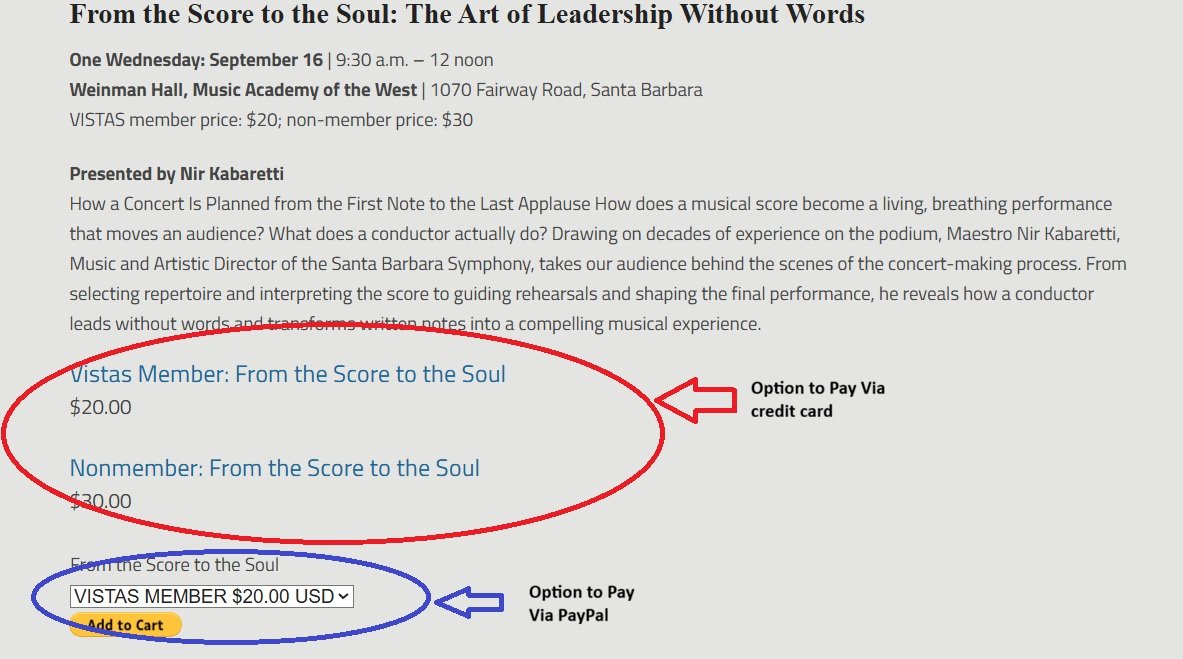
If you wish to register for a course(s) via credit card:
Click on the blue link for the course you are interested in attending (either member or nonmember, depending on your Vistas membership status)
This will take you to a page specifically for this course— click “add to cart”
If this is the only course you wish to regsiter for at this time, click the black shopping cart icon that appears. This will take you to your shopping cart— click “checkout” and follow instructions to enter your payment.
If you would like to register for more courses, return to the Current Courses page and repeat this process until your shopping cart has all of your desired courses. Then, click the black shopping cart icon that appears. This will take you to your shopping cart— click “checkout” and follow instructions to enter your payment.
If you wish to register for a course(s) via PayPal:
Click on the PayPal button below the course you are interested in attending.
Select either “Member” or “Nonmember,” in the dropdown menu, depending on your current membership status.
Click on the Add to Cart button and follow the instructions from PayPal.
You can add multiple courses on one transaction. It’s fast and easy!
OR (less desirable but nontheless welcome)
Print the flyer, complete the registration portion, and mail the form and your check to the address noted on the form.
Please be sure to enter all the information requested on the form, and note the name of the class on the memo area of your check.
Remember to sign your check!
For questions regarding registration, please contact Nichole LaViola, our business manager, at vistas@vistaslifelonglearning.org or 805-967-6030.